Cohere 嵌入
提供 Bedrock Cohere 嵌入模型。将生成式 AI 功能集成到关键应用程序和工作流程中,以改善业务成果。
AWS Bedrock Cohere 模型页面和Amazon Bedrock 用户指南包含有关如何使用 AWS 托管模型的详细信息。
先决条件
有关设置 API 访问,请参阅Amazon Bedrock 上的 Spring AI 文档。
自动配置
|
Spring AI 自动配置、启动模块的工件名称发生了重大变化。请参阅 升级说明 以获取更多信息。 |
将 spring-ai-starter-model-bedrock 依赖项添加到您项目的 Maven pom.xml 文件中
<dependency>
  <groupId>org.springframework.ai</groupId>
  <artifactId>spring-ai-starter-model-bedrock</artifactId>
</dependency>
或添加到您的 Gradle build.gradle 构建文件中。
dependencies {
    implementation 'org.springframework.ai:spring-ai-starter-model-bedrock'
}| 请参阅 依赖项管理 部分,将 Spring AI BOM 添加到您的构建文件中。 |
启用 Cohere 嵌入支持
默认情况下,Cohere 嵌入模型是禁用的。要启用它,请在您的应用程序配置中将 spring.ai.model.embedding 属性设置为 bedrock-cohere
spring.ai.model.embedding=bedrock-cohere或者,您可以使用 Spring 表达式语言 (SpEL) 引用环境变量
# In application.yml
spring:
  ai:
    model:
      embedding: ${AI_MODEL_EMBEDDING}
# In your environment or .env file
export AI_MODEL_EMBEDDING=bedrock-cohere您还可以在启动应用程序时使用 Java 系统属性设置此属性
java -Dspring.ai.model.embedding=bedrock-cohere -jar your-application.jar嵌入属性
前缀 spring.ai.bedrock.aws 是配置到 AWS Bedrock 连接的属性前缀。
| 财产 | 描述 | 默认值 |
|---|---|---|
spring.ai.bedrock.aws.region |
要使用的 AWS 区域。 |
us-east-1 |
spring.ai.bedrock.aws.access-key |
AWS 访问密钥。 |
- |
spring.ai.bedrock.aws.secret-key |
AWS 秘密密钥。 |
- |
|
嵌入自动配置的启用和禁用现在通过前缀为 要启用,spring.ai.model.embedding=bedrock-cohere(默认启用) 要禁用,spring.ai.model.embedding=none(或任何不匹配 bedrock-cohere 的值) 此更改是为了允许配置多个模型。 |
前缀 spring.ai.bedrock.cohere.embedding(在 BedrockCohereEmbeddingProperties 中定义)是配置 Cohere 嵌入模型实现的属性前缀。
财产 |
描述 |
默认值 |
spring.ai.model.embedding |
启用或禁用对 Cohere 的支持 |
bedrock-cohere |
spring.ai.bedrock.cohere.embedding.enabled(已移除且不再有效) |
启用或禁用对 Cohere 的支持 |
假 |
spring.ai.bedrock.cohere.embedding.model |
要使用的模型 ID。请参阅 CohereEmbeddingModel 以获取支持的模型。 |
cohere.embed-multilingual-v3 |
spring.ai.bedrock.cohere.embedding.options.input-type |
预先添加特殊令牌以区分每种类型。您不应将不同类型混合在一起,除非是用于搜索和检索的类型混合。在这种情况下,使用 search_document 类型嵌入您的语料库,并使用 search_query 类型嵌入查询。 |
SEARCH_DOCUMENT |
spring.ai.bedrock.cohere.embedding.options.truncate |
指定 API 如何处理长于最大令牌长度的输入。如果指定 LEFT 或 RIGHT,模型会丢弃输入,直到剩余输入恰好是模型的最大输入令牌长度。 |
NONE |
通过 Amazon Bedrock 访问 Cohere 时,截断功能不可用。这是 Amazon Bedrock 的一个问题。Spring AI 类 BedrockCohereEmbeddingModel 将截断为 2048 个字符的长度,这是模型支持的最大长度。 |
查看 CohereEmbeddingModel 以获取其他模型 ID。支持的值为:cohere.embed-multilingual-v3 和 cohere.embed-english-v3。模型 ID 值也可以在 AWS Bedrock 基本模型 ID 文档中找到。
所有以 spring.ai.bedrock.cohere.embedding.options 为前缀的属性都可以在运行时通过向 EmbeddingRequest 调用添加请求特定的运行时选项来覆盖。 |
运行时选项
BedrockCohereEmbeddingOptions.java 提供模型配置,例如 input-type 或 truncate。
在启动时,可以使用 BedrockCohereEmbeddingModel(api, options) 构造函数或 spring.ai.bedrock.cohere.embedding.options.* 属性配置默认选项。
在运行时,您可以通过向 EmbeddingRequest 调用添加新的、请求特定的选项来覆盖默认选项。例如,要为特定请求覆盖默认输入类型
EmbeddingResponse embeddingResponse = embeddingModel.call(
    new EmbeddingRequest(List.of("Hello World", "World is big and salvation is near"),
        BedrockCohereEmbeddingOptions.builder()
        .inputType(InputType.SEARCH_DOCUMENT)
        .build()));
示例控制器
创建一个新的 Spring Boot 项目并将 spring-ai-starter-model-bedrock 添加到您的 pom(或 gradle)依赖项中。
在 src/main/resources 目录下添加一个 application.properties 文件,以启用和配置 Cohere 嵌入模型
spring.ai.bedrock.aws.region=eu-central-1
spring.ai.bedrock.aws.access-key=${AWS_ACCESS_KEY_ID}
spring.ai.bedrock.aws.secret-key=${AWS_SECRET_ACCESS_KEY}

spring.ai.model.embedding=bedrock-cohere
spring.ai.bedrock.cohere.embedding.options.input-type=search-document
将 regions、access-key 和 secret-key 替换为您的 AWS 凭据。 |
这将创建一个 BedrockCohereEmbeddingModel 实现,您可以将其注入到您的类中。以下是一个简单的 @Controller 类使用聊天模型进行文本生成的示例。
@RestController
public class EmbeddingController {

    private final EmbeddingModel embeddingModel;

    @Autowired
    public EmbeddingController(EmbeddingModel embeddingModel) {
        this.embeddingModel = embeddingModel;
    }

    @GetMapping("/ai/embedding")
    public Map embed(@RequestParam(value = "message", defaultValue = "Tell me a joke") String message) {
        EmbeddingResponse embeddingResponse = this.embeddingModel.embedForResponse(List.of(message));
        return Map.of("embedding", embeddingResponse);
    }
}
手动配置
BedrockCohereEmbeddingModel 实现了 EmbeddingModel 并使用 低级 CohereEmbeddingBedrockApi 客户端连接到 Bedrock Cohere 服务。
将 spring-ai-bedrock 依赖项添加到您项目的 Maven pom.xml 文件中
<dependency>
    <groupId>org.springframework.ai</groupId>
    <artifactId>spring-ai-bedrock</artifactId>
</dependency>
或添加到您的 Gradle build.gradle 构建文件中。
dependencies {
    implementation 'org.springframework.ai:spring-ai-bedrock'
}| 请参阅 依赖项管理 部分,将 Spring AI BOM 添加到您的构建文件中。 |
接下来,创建 BedrockCohereEmbeddingModel 并将其用于文本嵌入
var cohereEmbeddingApi =new CohereEmbeddingBedrockApi(
		CohereEmbeddingModel.COHERE_EMBED_MULTILINGUAL_V1.id(),
		EnvironmentVariableCredentialsProvider.create(), Region.US_EAST_1.id(), new ObjectMapper());


var embeddingModel = new BedrockCohereEmbeddingModel(this.cohereEmbeddingApi);

EmbeddingResponse embeddingResponse = this.embeddingModel
	.embedForResponse(List.of("Hello World", "World is big and salvation is near"));
低级 CohereEmbeddingBedrockApi 客户端
CohereEmbeddingBedrockApi 提供了一个轻量级 Java 客户端,基于 AWS Bedrock Cohere Command 模型。
以下类图说明了 CohereEmbeddingBedrockApi 接口和构建块
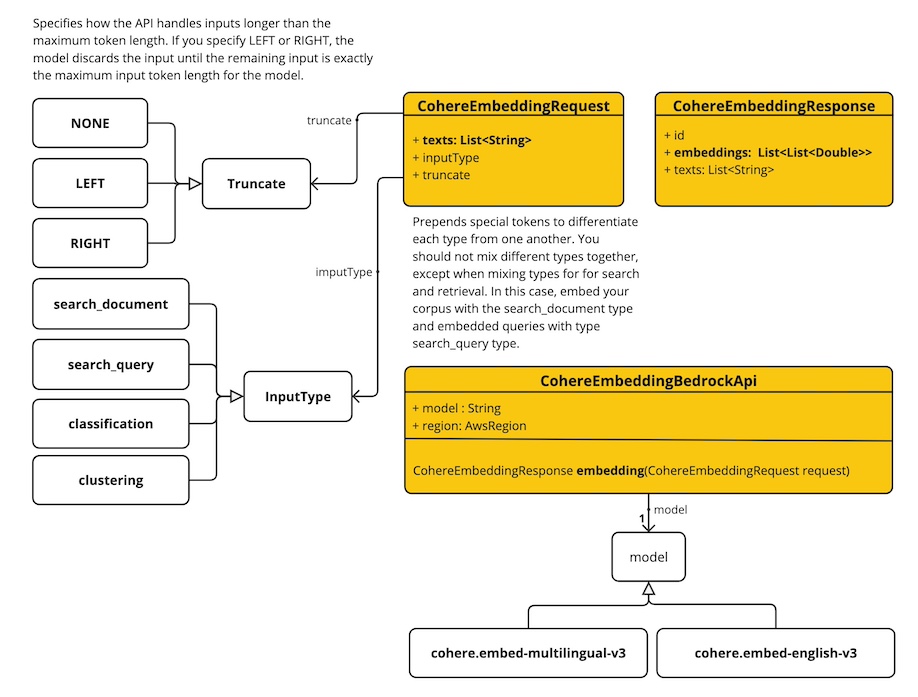
CohereEmbeddingBedrockApi 支持 cohere.embed-english-v3 和 cohere.embed-multilingual-v3 模型用于单次和批量嵌入计算。
这是一个如何以编程方式使用 API 的简单片段
CohereEmbeddingBedrockApi api = new CohereEmbeddingBedrockApi(
		CohereEmbeddingModel.COHERE_EMBED_MULTILINGUAL_V1.id(),
		EnvironmentVariableCredentialsProvider.create(),
		Region.US_EAST_1.id(), new ObjectMapper());

CohereEmbeddingRequest request = new CohereEmbeddingRequest(
		List.of("I like to eat apples", "I like to eat oranges"),
		CohereEmbeddingRequest.InputType.search_document,
		CohereEmbeddingRequest.Truncate.NONE);

CohereEmbeddingResponse response = this.api.embedding(this.request);
